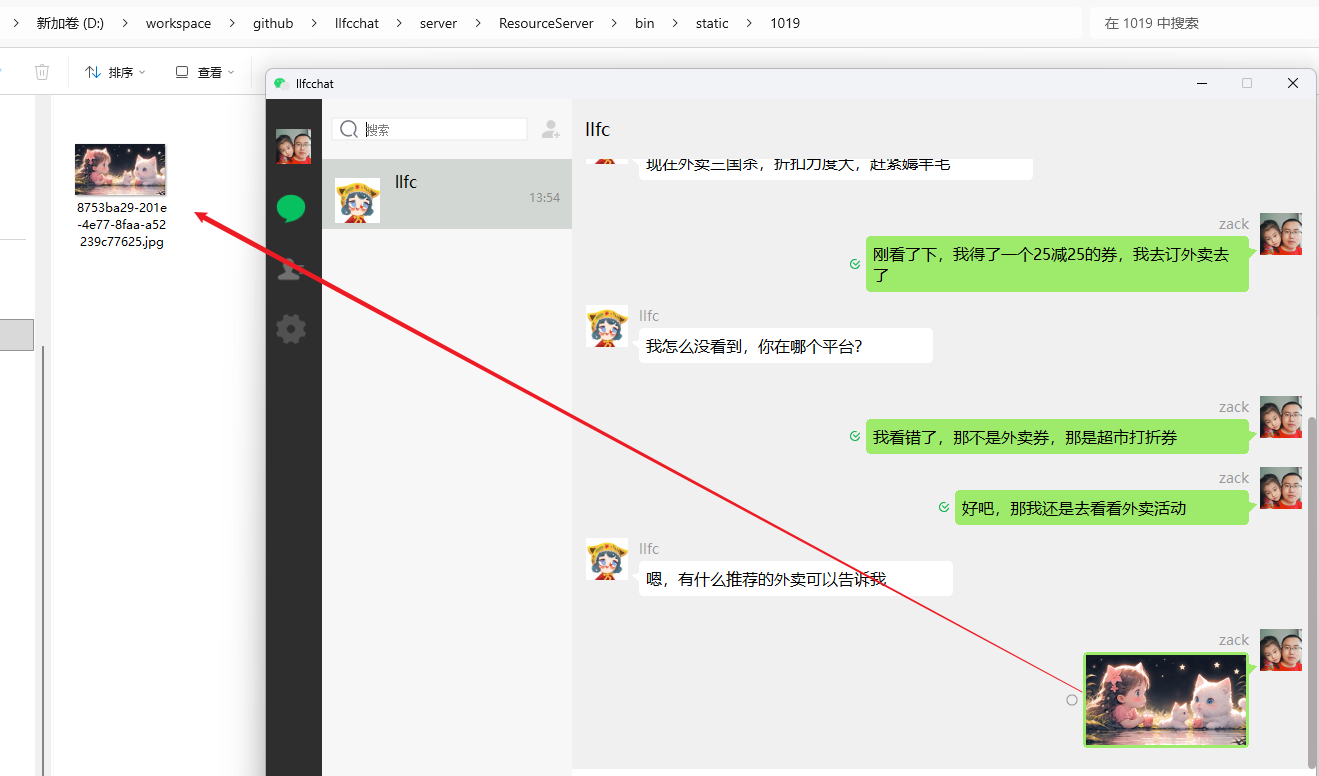



前言
前面实现了聊天信息的存储和加载,以及实现了一些资源的上传和下载。
接下来实现聊天中传输多媒体消息的逻辑,基本包括图片传输,视频传输和播放,文件传输等。
为了更顺利的实现功能,我打算先以图片聊天传输为切入点,然后再实现视频传输,文件传输等。
图片传输思路
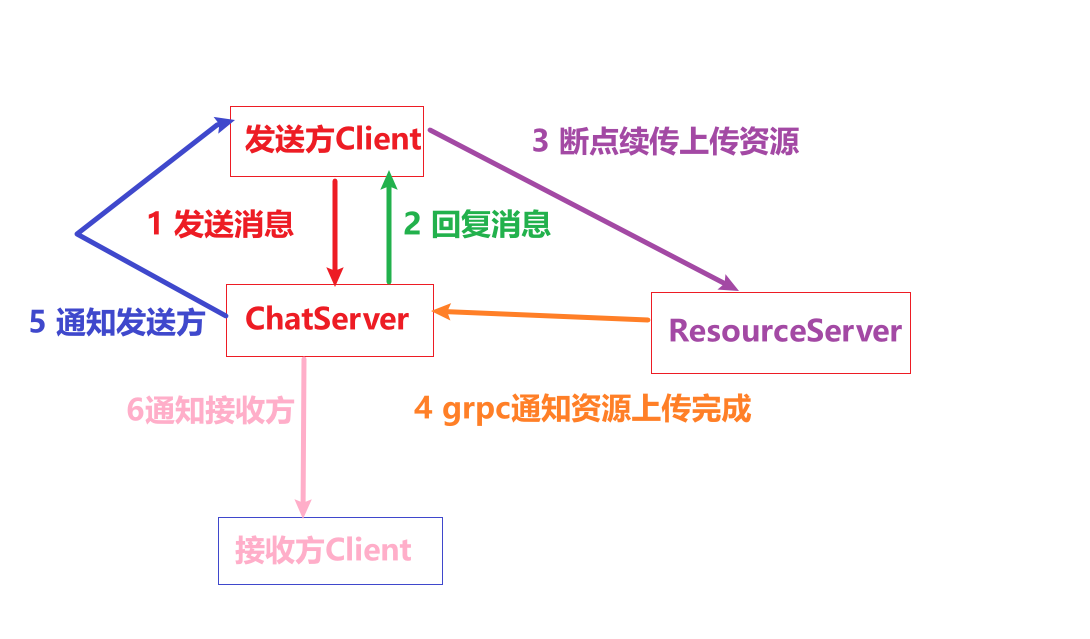
在聊天中传输图片
- 一方面是要把聊天消息传输到
ChatServer中 - 另一方面在收到
ChatServer的回复后,将资源断点续传方式传输给ResourceServer `ResourceServer需要采用断点上传方式回复给客户端。ResourceServer将接收完整资源后,需要通过grpc将消息发送给ChatServer更新消息为已经上传完成的状态。ChatServer收到消息后更新数据,并且做消息推送,推送给消息关联的双方。推送给发送方资源已经上传完成。推送给接收方资源已经上传完成- 发送方将图片设置为已上传状态,接收方则展示预览图,并显示进度百分比。
- 后期还要优化,发送方在上传资源的时候显示圆圈百分比。已经响应点击事件,暂停或者继续。
MsgInfo完善
我修改了MsgInfo的结构,以支持图片视频等多媒体资源在聊天中传输
struct MsgInfo{

    MsgInfo(MsgType msgtype, QString text_or_url, QPixmap pixmap, QString unique_name, qint64 total_size, QString md5)
    :_msg_type(msgtype), _text_or_url(text_or_url), _preview_pix(pixmap),_unique_name(unique_name),_total_size(total_size),
        _current_size(0),_seq(1),_md5(md5)
    {}

    MsgType _msg_type;
    QString _text_or_url;//表示文件和图像的url,文本信息
    QPixmap _preview_pix;//文件和图片的缩略图
    QString _unique_name; //文件唯一名字
    qint64 _total_size; //文件总大小
    qint64 _current_size; //传输大小
    qint64 _seq;          //传输序号
    QString _md5;         //文件md5
};
- 将内容字段改为
_text_or_url,表示文件和图像的url,或者纯文本信息 _preview_pix为文件或者图片的缩略图,如果为视频则需要抽取第一帧作为缩略图,如果文件则设置指定格式即可_unique_name为文件唯一名字,生成唯一名字有一个好处,同一个文件可以多次传输,每个文件按不同副本保存。当然也可以保存为同一份,采用md5做区分,总之这里先按照不同的副本存储在服务器。_total_size用来统计文件的总大小_current_size用来表示当前已经传输的大小_seq表示传输的序号,将来做断点续传使用_md5文件传输用的md5
修改插入消息的逻辑
void MessageTextEdit::insertMsgList(QVector<std::shared_ptr<MsgInfo>> &list, MsgType msgtype,
    QString text_or_url, QPixmap preview_pix,
    QString unique_name, uint64_t total_size, QString md5) {

    auto msg_info = std::make_shared<MsgInfo>(msgtype, text_or_url, preview_pix, unique_name, total_size, md5);
    list.append(msg_info);

}
将消息插入到消息列表,第一个参数是可选择的,有时我们需要将消息插入到全局消息列表。有时需要将消息插入到资源消息列表。
比如当我们拖动一个多媒体资源到富文本编辑框的时候,就是将这个资源的信息插入到资源消息列表。
当我们汇总所有的消息,用来发送的时候,就需要将消息添加到全局消息列表。
图片气泡框
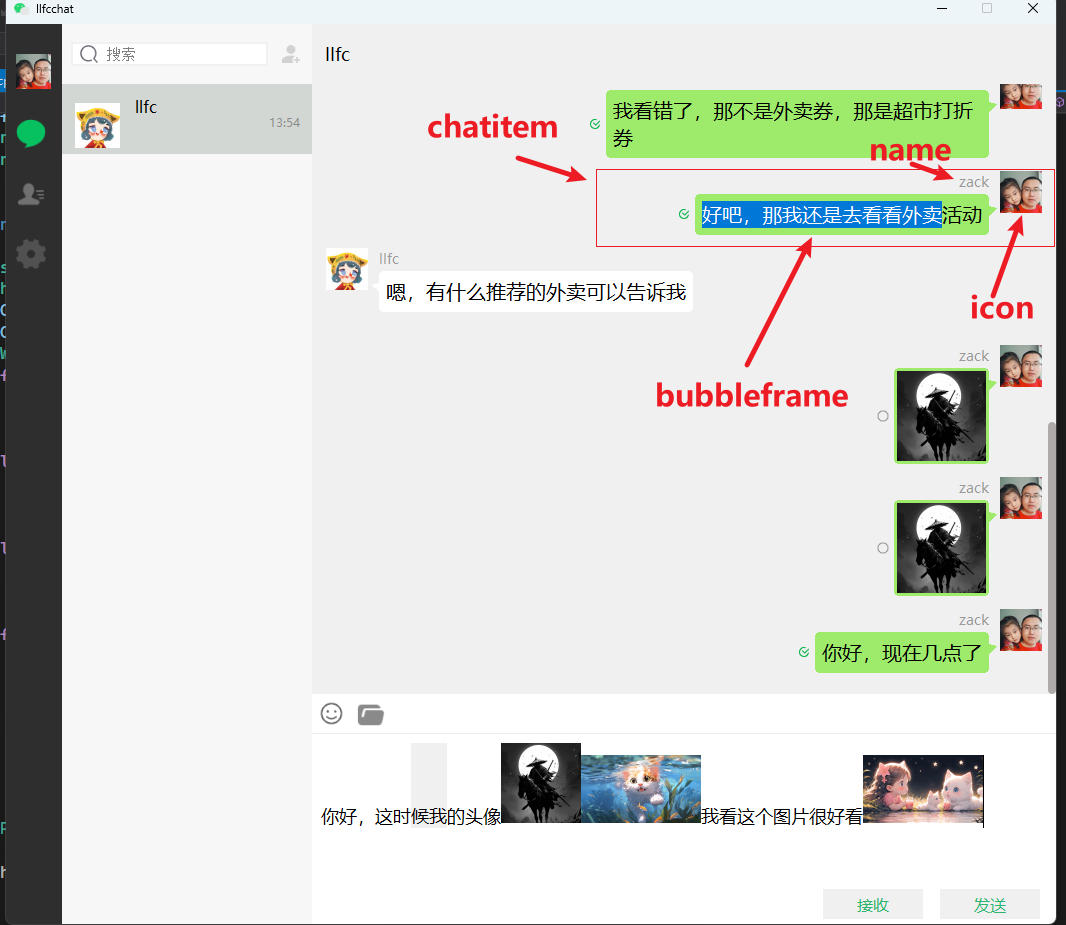
声明
class PictureBubble : public BubbleFrame
{
    Q_OBJECT
public:
    PictureBubble(const QPixmap &picture, ChatRole role, QWidget *parent = nullptr);
};
具体实现
#include "PictureBubble.h"
#include <QLabel>


#define PIC_MAX_WIDTH 160
#define PIC_MAX_HEIGHT 90

PictureBubble::PictureBubble(const QPixmap &picture, ChatRole role, QWidget *parent)
    :BubbleFrame(role, parent)
{
    QLabel *lb = new QLabel();
    lb->setScaledContents(true);
    QPixmap pix = picture.scaled(QSize(PIC_MAX_WIDTH, PIC_MAX_HEIGHT),
        Qt::KeepAspectRatio, Qt::SmoothTransformation);
    lb->setPixmap(pix);
    this->setWidget(lb);

    int left_margin = this->layout()->contentsMargins().left();
    int right_margin = this->layout()->contentsMargins().right();
    int v_margin = this->layout()->contentsMargins().bottom();
    setFixedSize(pix.width()+left_margin + right_margin, pix.height() + v_margin *2);
}
图片聊天消息
实现
class ImgChatData : public ChatDataBase {
public:
    ImgChatData(std::shared_ptr<MsgInfo> msg_info, QString unique_id,
        int thread_id, ChatFormType form_type, ChatMsgType msg_type,
        int send_uid, int status, QString chat_time = ""):
        ChatDataBase(unique_id,thread_id, form_type, msg_type, msg_info->_text_or_url,
            send_uid, status, chat_time), _msg_info(msg_info){

    }

    std::shared_ptr<MsgInfo> _msg_info;
};

Q_DECLARE_METATYPE(std::shared_ptr<ImgChatData>)
发送消息逻辑
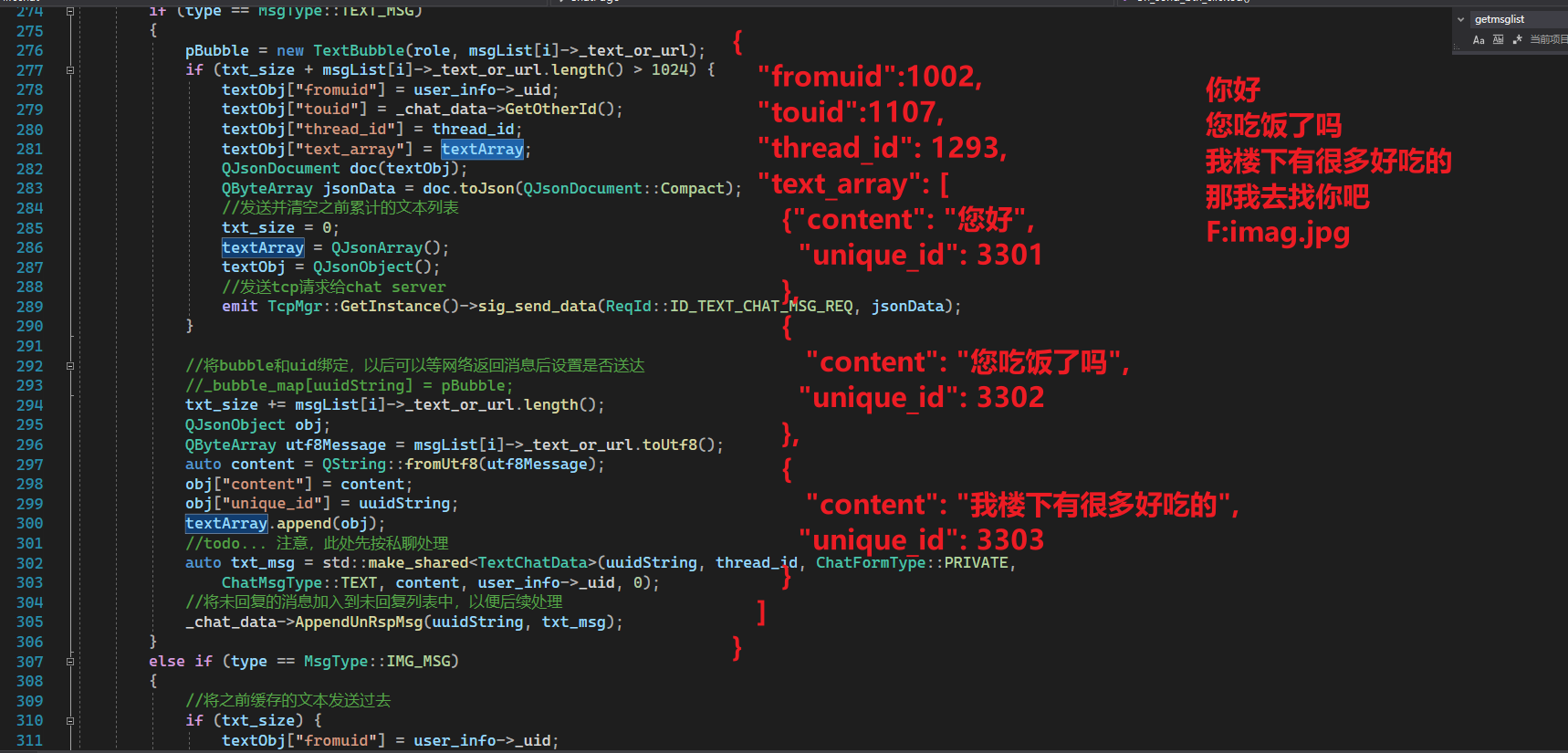
修改发送消息的逻辑,发送图片时,需要将之前的文本消息发送出去,再发送图片
void ChatPage::on_send_btn_clicked() {
    if (_chat_data == nullptr) {
        qDebug() << "friend_info is empty";
        return;
    }

    auto user_info = UserMgr::GetInstance()->GetUserInfo();
    auto pTextEdit = ui->chatEdit;
    ChatRole role = ChatRole::Self;
    QString userName = user_info->_name;
    QString userIcon = user_info->_icon;

    const QVector<std::shared_ptr<MsgInfo>>& msgList = pTextEdit->getMsgList();
    QJsonObject textObj;
    QJsonArray textArray;
    int txt_size = 0;
    auto thread_id = _chat_data->GetThreadId();
    for (int i = 0; i < msgList.size(); ++i)
    {
        //消息内容长度不合规就跳过
        if (msgList[i]->_text_or_url.length() > 1024) {
            continue;
        }

        MsgType type = msgList[i]->_msg_type;
        ChatItemBase* pChatItem = new ChatItemBase(role);
        pChatItem->setUserName(userName);
        SetSelfIcon(pChatItem, user_info->_icon);
        QWidget* pBubble = nullptr;
        //生成唯一id
        QUuid uuid = QUuid::createUuid();
        //转为字符串
        QString uuidString = uuid.toString();
        if (type == MsgType::TEXT_MSG)
        {
            pBubble = new TextBubble(role, msgList[i]->_text_or_url);
            if (txt_size + msgList[i]->_text_or_url.length() > 1024) {
                textObj["fromuid"] = user_info->_uid;
                textObj["touid"] = _chat_data->GetOtherId();
                textObj["thread_id"] = thread_id;
                textObj["text_array"] = textArray;
                QJsonDocument doc(textObj);
                QByteArray jsonData = doc.toJson(QJsonDocument::Compact);
                //发送并清空之前累计的文本列表
                txt_size = 0;
                textArray = QJsonArray();
                textObj = QJsonObject();
                //发送tcp请求给chat server
                emit TcpMgr::GetInstance()->sig_send_data(ReqId::ID_TEXT_CHAT_MSG_REQ, jsonData);
            }

            //将bubble和uid绑定,以后可以等网络返回消息后设置是否送达
            //_bubble_map[uuidString] = pBubble;
            txt_size += msgList[i]->_text_or_url.length();
            QJsonObject obj;
            QByteArray utf8Message = msgList[i]->_text_or_url.toUtf8();
            auto content = QString::fromUtf8(utf8Message);
            obj["content"] = content;
            obj["unique_id"] = uuidString;
            textArray.append(obj);
            //todo... 注意,此处先按私聊处理
            auto txt_msg = std::make_shared<TextChatData>(uuidString, thread_id, ChatFormType::PRIVATE,
                ChatMsgType::TEXT, content, user_info->_uid, 0);
            //将未回复的消息加入到未回复列表中,以便后续处理
            _chat_data->AppendUnRspMsg(uuidString, txt_msg);
        }
        else if (type == MsgType::IMG_MSG)
        {
            //将之前缓存的文本发送过去
            if (txt_size) {
                textObj["fromuid"] = user_info->_uid;
                textObj["touid"] = _chat_data->GetOtherId();
                textObj["thread_id"] = thread_id;
                textObj["text_array"] = textArray;
                QJsonDocument doc(textObj);
                QByteArray jsonData = doc.toJson(QJsonDocument::Compact);
                //发送并清空之前累计的文本列表
                txt_size = 0;
                textArray = QJsonArray();
                textObj = QJsonObject();
                //发送tcp请求给chat server
                emit TcpMgr::GetInstance()->sig_send_data(ReqId::ID_TEXT_CHAT_MSG_REQ, jsonData);
            }

            pBubble = new PictureBubble(QPixmap(msgList[i]->_text_or_url), role);
            //需要组织成文件发送,具体参考头像上传
            auto img_msg = std::make_shared<ImgChatData>(msgList[i],uuidString, thread_id, ChatFormType::PRIVATE,
                ChatMsgType::TEXT, user_info->_uid, 0);
            //将未回复的消息加入到未回复列表中,以便后续处理
            _chat_data->AppendUnRspMsg(uuidString, img_msg);
            textObj["fromuid"] = user_info->_uid;
            textObj["touid"] = _chat_data->GetOtherId();
            textObj["thread_id"] = thread_id;
            textObj["md5"] = msgList[i]->_md5;
            textObj["name"] = msgList[i]->_unique_name;
            textObj["token"] = UserMgr::GetInstance()->GetToken();
            textObj["unique_id"] = uuidString;
            //文件信息加入管理
            UserMgr::GetInstance()->AddTransFile(msgList[i]->_unique_name, msgList[i]);
            QJsonDocument doc(textObj);
            QByteArray jsonData = doc.toJson(QJsonDocument::Compact);
            //发送tcp请求给chat server
            emit TcpMgr::GetInstance()->sig_send_data(ReqId::ID_IMG_CHAT_MSG_REQ, jsonData);
        }
        else if (type == MsgType::FILE_MSG)
        {

        }
        //发送消息
        if (pBubble != nullptr)
        {
            pChatItem->setWidget(pBubble);
            pChatItem->setStatus(0);
            ui->chat_data_list->appendChatItem(pChatItem);
            _unrsp_item_map[uuidString] = pChatItem;
        }

    }

    qDebug() << "textArray is " << textArray;
    //发送给服务器
    textObj["text_array"] = textArray;
    textObj["fromuid"] = user_info->_uid;
    textObj["touid"] = _chat_data->GetOtherId();
    textObj["thread_id"] = thread_id;
    QJsonDocument doc(textObj);
    QByteArray jsonData = doc.toJson(QJsonDocument::Compact);
    //发送并清空之前累计的文本列表
    txt_size = 0;
    textArray = QJsonArray();
    textObj = QJsonObject();
    //发送tcp请求给chat server
    emit TcpMgr::GetInstance()->sig_send_data(ReqId::ID_TEXT_CHAT_MSG_REQ, jsonData);
}
接收服务器返回
先注册消息,用于跨线程调用
void TcpMgr::registerMetaType() {
    // 注册所有自定义类型
    qRegisterMetaType<ServerInfo>("ServerInfo");
    qRegisterMetaType<SearchInfo>("SearchInfo");
    qRegisterMetaType<std::shared_ptr<SearchInfo>>("std::shared_ptr<SearchInfo>");

    qRegisterMetaType<AddFriendApply>("AddFriendApply");
    qRegisterMetaType<std::shared_ptr<AddFriendApply>>("std::shared_ptr<AddFriendApply>");

    qRegisterMetaType<ApplyInfo>("ApplyInfo");

    qRegisterMetaType<std::shared_ptr<AuthInfo>>("std::shared_ptr<AuthInfo>");

    qRegisterMetaType<AuthRsp>("AuthRsp");
    qRegisterMetaType<std::shared_ptr<AuthRsp>>("std::shared_ptr<AuthRsp>");

    qRegisterMetaType<UserInfo>("UserInfo");

    qRegisterMetaType<std::vector<std::shared_ptr<TextChatData>>>("std::vector<std::shared_ptr<TextChatData>>");

    qRegisterMetaType<std::vector<std::shared_ptr<ChatThreadInfo>>>("std::vector<std::shared_ptr<ChatThreadInfo>>");

    qRegisterMetaType<std::shared_ptr<ChatThreadData>>("std::shared_ptr<ChatThreadData>");
    qRegisterMetaType<ReqId>("ReqId");
    qRegisterMetaType<std::shared_ptr<ImgChatData>>("std::shared_ptr<ImgChatData>");
}
注册消息
void TcpMgr::initHandlers()
{
    _handlers.insert(ID_IMG_CHAT_MSG_RSP, [this](ReqId id, int len, QByteArray data) {
        Q_UNUSED(len);
        qDebug() << "handle id is " << id << " data is " << data;
        // 将QByteArray转换为QJsonDocument
        QJsonDocument jsonDoc = QJsonDocument::fromJson(data);

        // 检查转换是否成功
        if (jsonDoc.isNull()) {
            qDebug() << "Failed to create QJsonDocument.";
            return;
        }

        QJsonObject jsonObj = jsonDoc.object();

        if (!jsonObj.contains("error")) {
            int err = ErrorCodes::ERR_JSON;
            qDebug() << "parse create private chat json parse failed " << err;
            return;
        }

        int err = jsonObj["error"].toInt();
        if (err != ErrorCodes::SUCCESS) {
            qDebug() << "get create private chat failed, error is " << err;
            return;
        }

        qDebug() << "Receive create private chat rsp Success";

        //收到消息后转发给页面
        auto thread_id = jsonObj["thread_id"].toInt();
        auto unique_id = jsonObj["unique_id"].toString();
        auto unique_name = jsonObj["unique_name"].toString();

        auto sender = jsonObj["fromuid"].toInt();
        auto msg_id = jsonObj["message_id"].toInt();
        QString chat_time = jsonObj["chat_time"].toString();
        int status = jsonObj["status"].toInt();

        auto file_info = UserMgr::GetInstance()->GetTransFileByName(unique_name);

        auto chat_data = std::make_shared<ImgChatData>(file_info, unique_id, thread_id, ChatFormType::PRIVATE,
            ChatMsgType::TEXT, sender, status, chat_time);

        //发送信号通知界面
        emit sig_chat_img_rsp(thread_id, chat_data);
        });

}
服务器接收图片消息
先注册消息
void LogicSystem::RegisterCallBacks() {

    _fun_callbacks[ID_LOAD_CHAT_MSG_REQ] = std::bind(&LogicSystem::LoadChatMsg, this,
        placeholders::_1, placeholders::_2, placeholders::_3);

    _fun_callbacks[ID_IMG_CHAT_MSG_REQ] = std::bind(&LogicSystem::DealChatImgMsg, this,
        placeholders::_1, placeholders::_2, placeholders::_3);
}
处理聊天中的图片消息
void LogicSystem::DealChatImgMsg(std::shared_ptr<CSession> session,
    const short& msg_id, const string& msg_data) {
    Json::Reader reader;
    Json::Value root;
    reader.parse(msg_data, root);

    auto uid = root["fromuid"].asInt();
    auto touid = root["touid"].asInt();

    auto md5 = root["md5"].asString();
    auto unique_name = root["name"].asString();
    auto token = root["token"].asString();
    auto unique_id = root["unique_id"].asString();
    auto chat_time = root["chat_time"].asString();
    auto status = root["status"].asInt();

    Json::Value  rtvalue;
    rtvalue["error"] = ErrorCodes::Success;

    rtvalue["fromuid"] = uid;
    rtvalue["touid"] = touid;
    auto thread_id = root["thread_id"].asInt();
    rtvalue["thread_id"] = thread_id;
    rtvalue["md5"] = md5;
    rtvalue["unique_name"] = unique_name;
    rtvalue["unique_id"] = unique_id;
    rtvalue["chat_time"] = chat_time;
    rtvalue["status"] = status;

    auto timestamp = getCurrentTimestamp();
    auto chat_msg = std::make_shared<ChatMessage>();
    chat_msg->chat_time = timestamp;
    chat_msg->sender_id = uid;
    chat_msg->recv_id = touid;
    chat_msg->unique_id = unique_id;
    chat_msg->thread_id = thread_id;
    chat_msg->content = unique_name;
    chat_msg->status = MsgStatus::UN_UPLOAD;


    //插入数据库
    MysqlMgr::GetInstance()->AddChatMsg(chat_msg);

    Defer defer([this, &rtvalue, session]() {
        std::string return_str = rtvalue.toStyledString();
        session->Send(return_str, ID_IMG_CHAT_MSG_RSP);
        });

    //发送通知 todo... 以后等文件上传完成再通知
}
聊天资源断点续传
之前我们实现了1和2,接下来在客户端Client收到ChatServer的回复消息2后,需要执行步骤3
这期间要在客户端和服务器之间实现断点续传。
发送资源
  _handlers.insert(ID_IMG_CHAT_MSG_RSP, [this](ReqId id, int len, QByteArray data) {
        Q_UNUSED(len);
        qDebug() << "handle id is " << id << " data is " << data;
        // 将QByteArray转换为QJsonDocument
        QJsonDocument jsonDoc = QJsonDocument::fromJson(data);

        // 检查转换是否成功
        if (jsonDoc.isNull()) {
            qDebug() << "Failed to create QJsonDocument.";
            return;
        }

        QJsonObject jsonObj = jsonDoc.object();

        if (!jsonObj.contains("error")) {
            int err = ErrorCodes::ERR_JSON;
            qDebug() << "parse create private chat json parse failed " << err;
            return;
        }

        int err = jsonObj["error"].toInt();
        if (err != ErrorCodes::SUCCESS) {
            qDebug() << "get create private chat failed, error is " << err;
            return;
        }

        qDebug() << "Receive create private chat rsp Success";

        //收到消息后转发给页面
        auto thread_id = jsonObj["thread_id"].toInt();
        auto unique_id = jsonObj["unique_id"].toString();
        auto unique_name = jsonObj["unique_name"].toString();

        auto sender = jsonObj["fromuid"].toInt();
        auto msg_id = jsonObj["message_id"].toInt();
        QString chat_time = jsonObj["chat_time"].toString();
        int status = jsonObj["status"].toInt();
        auto text_or_url = jsonObj["text_or_url"].toString();

        auto file_info = UserMgr::GetInstance()->GetTransFileByName(unique_name);

        auto chat_data = std::make_shared<ImgChatData>(file_info, unique_id, thread_id, ChatFormType::PRIVATE,
            ChatMsgType::TEXT, sender, status, chat_time);

        //发送信号通知界面
        emit sig_chat_img_rsp(thread_id, chat_data);

        //创建QFileInfo 对象 todo 留作以后收到服务器返回消息后再发送
        QFile file(file_info->_text_or_url);
        if (!file.open(QIODevice::ReadOnly)) {
            qWarning() << "Could not open file:" << file.errorString();
            return;
        }

        file.seek(file_info->_current_size);
        auto buffer = file.read(MAX_FILE_LEN);
        qDebug() << "buffer is " << buffer;
        //将文件内容转换为base64编码
        QString base64Data = buffer.toBase64();
        QJsonObject file_obj;
        file_obj["name"] = file_info->_unique_name;
        file_obj["unique_id"] = unique_id;
        file_obj["seq"] = file_info->_seq;
        file_info->_current_size = buffer.size() + (file_info->_seq - 1) * MAX_FILE_LEN;
        file_obj["trans_size"] = file_info->_current_size;
        file_obj["total_size"] = file_info->_total_size;
        file_obj["token"] = UserMgr::GetInstance()->GetToken();
        file_obj["md5"] = file_info->_md5;
        file_obj["uid"] = UserMgr::GetInstance()->GetUid();
        file_obj["data"] = base64Data;

        if (buffer.size() + (file_info->_seq - 1) * MAX_FILE_LEN >= file_info->_total_size) {
            file_obj["last"] = 1;
        }
        else {
            file_obj["last"] = 0;
        }

        //发送文件  todo 留作以后收到服务器返回消息后再发送
        QJsonDocument doc_file(file_obj);
        QByteArray fileData = doc_file.toJson(QJsonDocument::Compact);

        //发送消息给ResourceServer
        FileTcpMgr::GetInstance()->SendData(ReqId::ID_IMG_CHAT_UPLOAD_REQ, fileData);

        });
我们的客户端在收到服务器的回复(步骤2)之后,立刻读取文件,发送第一个包,这里通过FileTcpMgr发送资源给ResourceServer
资源服务器存储
我们实现断点续传,在LogicWorker中注册处理逻辑
void LogicWorker::RegisterCallBacks()
{
    _fun_callbacks[ID_IMG_CHAT_UPLOAD_REQ] = [this](shared_ptr<CSession> session, const short& msg_id,
        const string& msg_data) {
            Json::Reader reader;
            Json::Value root;
            reader.parse(msg_data, root);
            auto md5 = root["md5"].asString();
            auto seq = root["seq"].asInt();
            auto name = root["name"].asString();
            auto total_size = root["total_size"].asInt();
            auto trans_size = root["trans_size"].asInt();
            auto last = root["last"].asInt();
            auto file_data = root["data"].asString();
            auto file_path = ConfigMgr::Inst().GetFileOutPath();
            auto uid = root["uid"].asInt();
            //转化为字符串
            auto uid_str = std::to_string(uid);
            auto file_path_str = (file_path / uid_str / name).string();
            Json::Value  rtvalue;

            auto callback = [=](const Json::Value& result) {

                // 在异步任务完成后调用
                Json::Value rtvalue = result;
                rtvalue["error"] = ErrorCodes::Success;
                rtvalue["total_size"] = total_size;
                rtvalue["seq"] = seq;
                rtvalue["name"] = name;
                rtvalue["trans_size"] = trans_size;
                rtvalue["last"] = last;
                rtvalue["md5"] = md5;
                rtvalue["uid"] = uid;
                std::string return_str = rtvalue.toStyledString();
                session->Send(return_str, ID_IMG_CHAT_UPLOAD_RSP);
            };

            // 使用 std::hash 对字符串进行哈希
            std::hash<std::string> hash_fn;
            size_t hash_value = hash_fn(name); // 生成哈希值
            int index = hash_value % FILE_WORKER_COUNT;
            std::cout << "Hash value: " << hash_value << std::endl;

            //第一个包
            if (seq == 1) {
                //构造数据存储
                auto file_info = std::make_shared<FileInfo>();
                file_info->_file_path_str = file_path_str;
                file_info->_name = name;
                file_info->_seq = seq;
                file_info->_total_size = total_size;
                file_info->_trans_size = trans_size;
                bool success = RedisMgr::GetInstance()->SetFileInfo(name, file_info);
                if (!success) {
                    rtvalue["error"] = ErrorCodes::FileSaveRedisFailed;
                    std::string return_str = rtvalue.toStyledString();
                    session->Send(return_str, ID_UPLOAD_HEAD_ICON_RSP);
                    return;
                }
            }
            else {
                auto file_info = RedisMgr::GetInstance()->GetFileInfo(name);
                if (file_info == nullptr) {
                    rtvalue["error"] = ErrorCodes::FileNotExists;
                    std::string return_str = rtvalue.toStyledString();
                    session->Send(return_str, ID_UPLOAD_HEAD_ICON_RSP);
                    return;
                }
                file_info->_seq = seq;
                file_info->_trans_size = trans_size;
                bool success = RedisMgr::GetInstance()->SetFileInfo(name, file_info);
                if (!success) {
                    rtvalue["error"] = ErrorCodes::FileSaveRedisFailed;
                    std::string return_str = rtvalue.toStyledString();
                    session->Send(return_str, ID_UPLOAD_HEAD_ICON_RSP);
                    return;
                }
            }


            FileSystem::GetInstance()->PostMsgToQue(
                std::make_shared<FileTask>(session, ID_IMG_CHAT_UPLOAD_REQ, uid, file_path_str, name, seq, total_size,
                    trans_size, last, file_data, callback),
                index
            );
    };
}
- 通过callback存储回调函数,一同包裹进
FileInfo, 回调函数通过=捕获所有局部变量,这样构造了一个伪闭包。 - 我们将包裹好的
FileInfo投递到FileSystem中,交给其中的线程池,由多个FileWorker线程处理
我们跟进FileSystem的投递逻辑
void FileSystem::PostMsgToQue(shared_ptr<FileTask> msg, int index)
{
    _file_workers[index]->PostTask(msg);
}
FileWorker投递逻辑
void FileWorker::PostTask(std::shared_ptr<FileTask> task)
{
    {
        std::lock_guard<std::mutex> lock(_mtx);
        //借鉴python万物皆对象思想,构造伪闭包将函数对象扔到队列中
        _task_que.push([task, this]() {
            task_callback(task);
            });
    }

    _cv.notify_one();
}
我们将任务直接包裹到一个lambda表达式中,利用python万物皆对象的思想,结合C++语法,将这个可调用对象投递给队列。
将来可调用对象从队列取出后就会调用这个lambda表达式, 进而调用task_callback函数
FileWorker::FileWorker() :_b_stop(false)
{
    RegisterHandlers();
    _work_thread = std::thread([this]() {
        while (!_b_stop) {
            std::unique_lock<std::mutex> lock(_mtx);
            _cv.wait(lock, [this]() {
                if (_b_stop) {
                    return true;
                }

                if (_task_que.empty()) {
                    return false;
                }

                return true;
                });

            if (_b_stop) {
                break;
            }

            auto task_call = _task_que.front();
            _task_que.pop();
            task_call();
        }

        });
}
调用逻辑
void FileWorker::task_callback(std::shared_ptr<FileTask> task)
{
    auto iter = _handlers.find(task->_msg_id);
    if (iter == _handlers.end()) {
        return;
    }

    iter->second(task);
}
从_handlers中根据消息id检索,取出回调函数,传入task参数调用
_handlers的注册逻辑
void FileWorker::RegisterHandlers()
{
    //处理头像上传
    _handlers[ID_UPLOAD_HEAD_ICON_REQ] = [this](std::shared_ptr<FileTask> task) {
        // 解码
        std::string decoded = base64_decode(task->_file_data);

        auto file_path_str = task->_path;
        auto last = task->_last;
        //std::cout << "file_path_str is " << file_path_str << std::endl;

        boost::filesystem::path file_path(file_path_str);
        boost::filesystem::path dir_path = file_path.parent_path();
        // 获取完整文件名(包含扩展名)
        std::string filename = file_path.filename().string();
        Json::Value result;
        result["error"] = ErrorCodes::Success;

        // Check if directory exists, if not, create it
        if (!boost::filesystem::exists(dir_path)) {
            if (!boost::filesystem::create_directories(dir_path)) {
                std::cerr << "Failed to create directory: " << dir_path.string() << std::endl;
                result["error"] = ErrorCodes::FileNotExists;
                task->_callback(result);
                return;
            }
        }


        std::ofstream outfile;
        //第一个包
        if (task->_seq == 1) {
            // 打开文件,如果存在则清空,不存在则创建
            outfile.open(file_path_str, std::ios::binary | std::ios::trunc);
        }
        else {
            // 保存为文件
            outfile.open(file_path_str, std::ios::binary | std::ios::app);
        }


        if (!outfile) {
            std::cerr << "无法打开文件进行写入。" << std::endl;
            result["error"] = ErrorCodes::FileWritePermissionFailed;
            task->_callback(result);
            return;
        }

        outfile.write(decoded.data(), decoded.size());
        if (!outfile) {
            std::cerr << "写入文件失败。" << std::endl;
            result["error"] = ErrorCodes::FileWritePermissionFailed;
            task->_callback(result);
            return;
        }

        outfile.close();
        if (last) {
            std::cout << "文件已成功保存为: " << task->_name << std::endl;
            //更新头像
            MysqlMgr::GetInstance()->UpdateUserIcon(task->_uid, filename);
            //获取用户信息
            auto user_info = MysqlMgr::GetInstance()->GetUser(task->_uid);
            if (user_info == nullptr) {
                return;
            }

            //将数据库内容写入redis缓存
            Json::Value redis_root;
            redis_root["uid"] = task->_uid;
            redis_root["pwd"] = user_info->pwd;
            redis_root["name"] = user_info->name;
            redis_root["email"] = user_info->email;
            redis_root["nick"] = user_info->nick;
            redis_root["desc"] = user_info->desc;
            redis_root["sex"] = user_info->sex;
            redis_root["icon"] = user_info->icon;
            std::string base_key = USER_BASE_INFO + std::to_string(task->_uid);
            RedisMgr::GetInstance()->Set(base_key, redis_root.toStyledString());
        }

        if (task->_callback) {
            task->_callback(result);
        }
    };

    //处理聊天图片上传
    _handlers[ID_IMG_CHAT_UPLOAD_REQ] = [this](std::shared_ptr<FileTask> task) {
        // 解码
        std::string decoded = base64_decode(task->_file_data);

        auto file_path_str = task->_path;
        auto last = task->_last;
        //std::cout << "file_path_str is " << file_path_str << std::endl;

        boost::filesystem::path file_path(file_path_str);
        boost::filesystem::path dir_path = file_path.parent_path();
        // 获取完整文件名(包含扩展名)
        std::string filename = file_path.filename().string();
        Json::Value result;
        result["error"] = ErrorCodes::Success;

        // Check if directory exists, if not, create it
        if (!boost::filesystem::exists(dir_path)) {
            if (!boost::filesystem::create_directories(dir_path)) {
                std::cerr << "Failed to create directory: " << dir_path.string() << std::endl;
                result["error"] = ErrorCodes::FileNotExists;
                task->_callback(result);
                return;
            }
        }


        std::ofstream outfile;
        //第一个包
        if (task->_seq == 1) {
            // 打开文件,如果存在则清空,不存在则创建
            outfile.open(file_path_str, std::ios::binary | std::ios::trunc);
        }
        else {
            // 保存为文件
            outfile.open(file_path_str, std::ios::binary | std::ios::app);
        }


        if (!outfile) {
            std::cerr << "无法打开文件进行写入。" << std::endl;
            result["error"] = ErrorCodes::FileWritePermissionFailed;
            task->_callback(result);
            return;
        }

        outfile.write(decoded.data(), decoded.size());
        if (!outfile) {
            std::cerr << "写入文件失败。" << std::endl;
            result["error"] = ErrorCodes::FileWritePermissionFailed;
            task->_callback(result);
            return;
        }

        outfile.close();
        if (last) {
            std::cout << "文件已成功保存为: " << task->_name << std::endl;
            //todo...更新数据库聊天图像上传状态
            //通过grpc通知ChatServer
        }

        if (task->_callback) {
            task->_callback(result);
        }
    };
}
比如是聊天图片上传的请求,就调用如下
_handlers[ID_IMG_CHAT_UPLOAD_REQ] = [this](std::shared_ptr<FileTask> task) {
        // 解码
        std::string decoded = base64_decode(task->_file_data);

        auto file_path_str = task->_path;
        auto last = task->_last;
        //std::cout << "file_path_str is " << file_path_str << std::endl;

        boost::filesystem::path file_path(file_path_str);
        boost::filesystem::path dir_path = file_path.parent_path();
        // 获取完整文件名(包含扩展名)
        std::string filename = file_path.filename().string();
        Json::Value result;
        result["error"] = ErrorCodes::Success;

        // Check if directory exists, if not, create it
        if (!boost::filesystem::exists(dir_path)) {
            if (!boost::filesystem::create_directories(dir_path)) {
                std::cerr << "Failed to create directory: " << dir_path.string() << std::endl;
                result["error"] = ErrorCodes::FileNotExists;
                task->_callback(result);
                return;
            }
        }


        std::ofstream outfile;
        //第一个包
        if (task->_seq == 1) {
            // 打开文件,如果存在则清空,不存在则创建
            outfile.open(file_path_str, std::ios::binary | std::ios::trunc);
        }
        else {
            // 保存为文件
            outfile.open(file_path_str, std::ios::binary | std::ios::app);
        }


        if (!outfile) {
            std::cerr << "无法打开文件进行写入。" << std::endl;
            result["error"] = ErrorCodes::FileWritePermissionFailed;
            task->_callback(result);
            return;
        }

        outfile.write(decoded.data(), decoded.size());
        if (!outfile) {
            std::cerr << "写入文件失败。" << std::endl;
            result["error"] = ErrorCodes::FileWritePermissionFailed;
            task->_callback(result);
            return;
        }

        outfile.close();
        if (last) {
            std::cout << "文件已成功保存为: " << task->_name << std::endl;
            //todo...更新数据库聊天图像上传状态
            //通过grpc通知ChatServer
        }

        if (task->_callback) {
            task->_callback(result);
        }
    };
在这个逻辑里我们打开文件,并采取追加的方式将数据写入服务器所在的磁盘目录保存
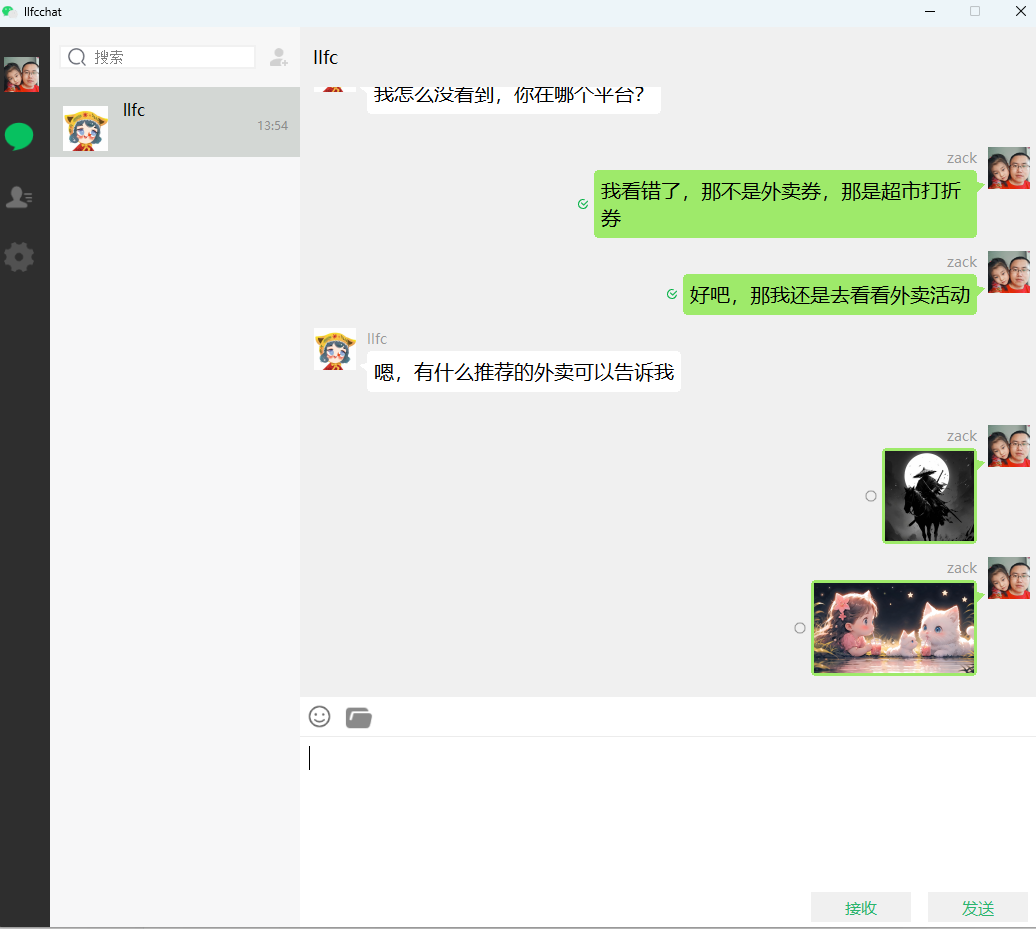
测试效果
结论
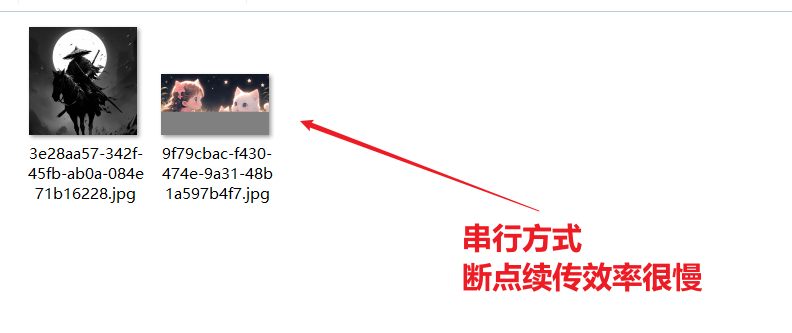
- 经过测试,可以实现断点续传上传聊天资源的功能
- 但是对于大文件,采用串行方式断点续传效率很慢
- 考虑搞一个拥塞窗口多序列传输,本质上还是通过网络线程串行上传,但不是等待服务器回复后才上传,而是通过一个拥塞窗口控制发送频率。
设计拥塞窗口提高发送效率
思路分析
客户端发送端单线程还是多线程
本质上客户端如果采用切片的方式将一个文件切割为多个小文件,可以不考虑顺序,将来汇总服务器的回包统计是否传输完成即可。
但是对于同一个socket多线程调用send会产生数据错乱,对于asio这种网络库,我们采用的是发送队列控制顺序,保证互斥性,一个包发送完成再发送下一个。
对于QT其底层封装了发送队列,支持多线程并发调用send,但是本质上底层的发送还是很串行化。
所以对于现有的结构,我们通过跨线程的方式,将要发送的数据投递给FileMgr所在的线程的消息队列,统一发送。
这个结构不用改。
客户端发送逻辑修改
客户端不再等待服务器回包后再发送,而是将切割好的包一次性添加到发送队列。
但是如果文件过大,要几百个包,一次性会堆满队列,另外循环发送几百个包会造成网络拥塞,导致服务器一段时间只为这一个客户端服务,这是不可取的。
拥塞窗口设计
为了解决这个问题,我们可以优先将要发送的数据放入拥塞窗口,处于拥塞窗口的数据优先发送
其余的数据投递到队列中。
如果文件数据过多,可以优先将一部分数据放入队列,等到队列队列大小缩小后继续放入数据。
当客户端收到服务器回包后,做错误判断,如果无误则从队列取出数据放到拥塞窗口中继续发送。
队列减小到一定阈值后,将文件剩余未发送的包继续填充到队列中。
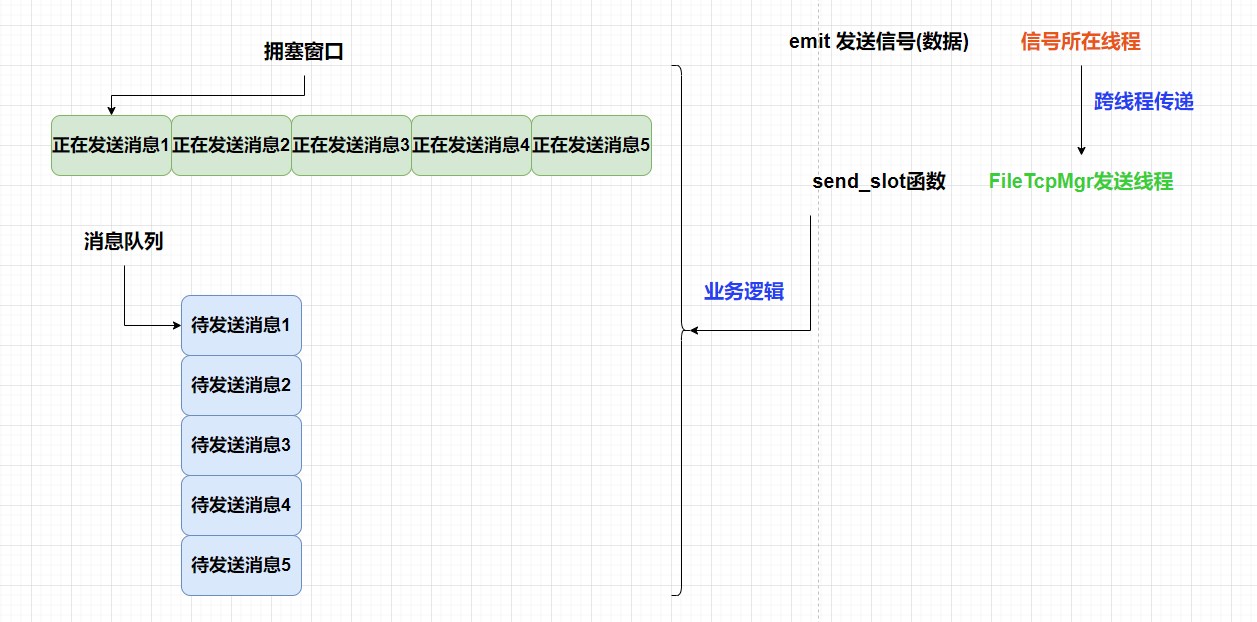
这么做还要考虑如果发送失败,就要清除队列中该次未发送的数据包。
如果发送两个文件,队列中的数据将会是交叉的。所以对于错误处理,要考虑剔除发送失败的包。
数据结构设计:
struct SendTask {
    int file_id;        // 文件唯一标识
    int chunk_id;       // 分片序号
    int total_chunks;   // 总分片数
    vector<char> data;  // 数据内容
    int retry_count;    // 重试次数
};
队列管理:
- 使用map
- 发送失败时,只清除对应file_id的所有待发送包
- 维护已发送但未确认的包列表,便于超时重传
服务器逻辑
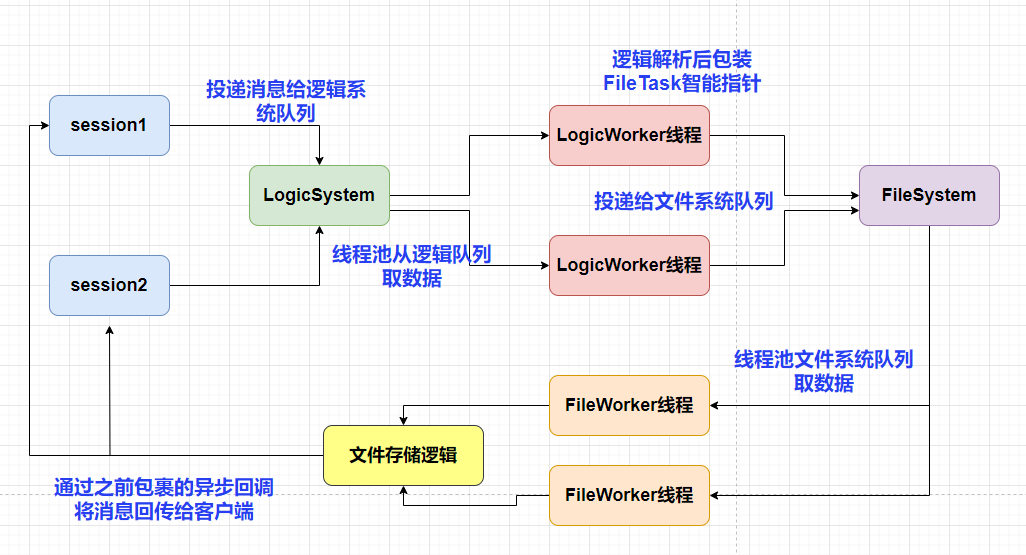
服务器是多线程还是单线程
服务器可以采用多线程方式处理收到的文件包,可以采用多线程的方式写如文件,但是对于同一个文件要加锁。
本质上同一个时刻只有一个线程可以对文件进行读写。所以干脆就用一个线程负责一个文件的写,可以根据session_id区分不同的连接,对于同一个连接采用同一个FileWorker执行写就可以了。
这样不用加锁还保证线程安全了。
服务器乱序存储
服务器不再用原来的线性方式将内容追加到磁盘上。
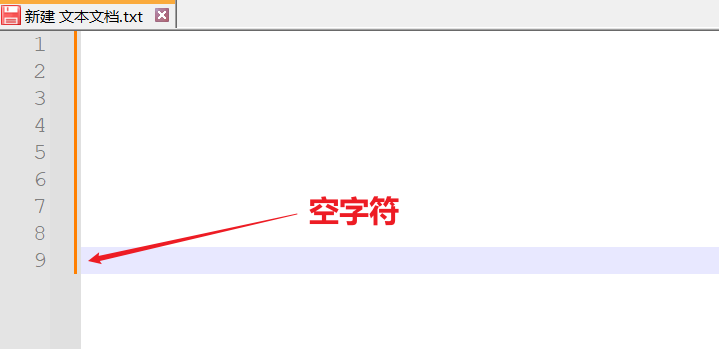
而是优先接收客户端的第一个包,获取文件信息,然后按照seq个数创建文件大小,在最后一个字节写入空,这样整个空文件就构造好了。
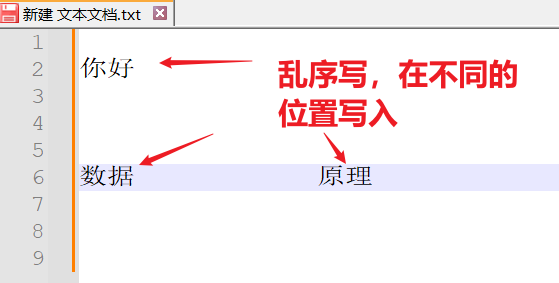
然后服务器每次接收到客户端的乱序序列后,将内容写入对应的偏移位置。并且回复客户端,将序列号和文件基本信息回复给客户端。
客户端实现拥塞窗口
窗口大小成员
在FileTcpMgr中添加成员变量
class FileTcpMgr : public QObject, public Singleton<FileTcpMgr>,
        public std::enable_shared_from_this<FileTcpMgr>{

    //发送的拥塞窗口,控制发送数量
    int _cwnd_size;
}
封装发送逻辑
class FileTcpMgr : public QObject, public Singleton<FileTcpMgr>,
        public std::enable_shared_from_this<FileTcpMgr>
{
    Q_OBJECT
public:
    void BatchSend(std::shared_ptr<MsgInfo> msg_info);
}
具体实现
void FileTcpMgr::BatchSend(std::shared_ptr<MsgInfo> msg_info) {

    if ((msg_info->_seq) * MAX_FILE_LEN >= msg_info->_total_size) {
        qDebug() << "file has sent finished";
        return;
    }

    if (MAX_CWND_SIZE - _cwnd_size == 0) {
        return;
    }

    //打开
    QFile file(msg_info->_text_or_url);
    if (!file.open(QIODevice::ReadOnly)) {
        qWarning() << "Could not open file: " << file.errorString();
        return;
    }

    //文件偏移到已经发送的位置,继续读取发送
    file.seek(msg_info->_seq * MAX_FILE_LEN);

    bool b_last = false;
    //再次组织数据发送
    for (; MAX_CWND_SIZE - _cwnd_size > 0; ) {

        QByteArray buffer;
        msg_info->_seq++;
        //放入发送未回包集合
        msg_info->_flighting_seqs.insert(msg_info->_seq);
        //每次读取MAX_FILE_LEN字节发送
        buffer = file.read(MAX_FILE_LEN);
        QJsonObject sendObj;
        //将文件内容转换为base64编码
        QString base64Data = buffer.toBase64();
        sendObj["md5"] = msg_info->_md5;
        sendObj["name"] = msg_info->_unique_name;
        sendObj["seq"] = msg_info->_seq;
        sendObj["trans_size"] = buffer.size() + (msg_info->_seq - 1) * MAX_FILE_LEN;
        sendObj["total_size"] = msg_info->_total_size;

        b_last = false;
        if (buffer.size() + (msg_info->_seq - 1) * MAX_FILE_LEN >= msg_info->_total_size) {
            sendObj["last"] = 1;
            b_last = true;
        }
        else {
            sendObj["last"] = 0;
        }

        sendObj["data"] = base64Data;
        sendObj["last_seq"] = msg_info->_max_seq;
        sendObj["uid"] = UserMgr::GetInstance()->GetUid();
        QJsonDocument doc(sendObj);
        auto send_data = doc.toJson();
        //直接发送,其实是放入tcpmgr发送队列
        SendData(ID_IMG_CHAT_UPLOAD_REQ, send_data);
        _cwnd_size++;
        //如果
        if (b_last) {
            break;
        }
    }

    file.close();
}
同步发送信息
考虑以后很多场景都会将发送信息同步给服务器,所以单独抽象了一个发送协议
在TcpMgr收到聊天消息回复后,可以考虑先将图片信息同步给资源服务器
  _handlers.insert(ID_IMG_CHAT_MSG_RSP, [this](ReqId id, int len, QByteArray data) {
        Q_UNUSED(len);
        qDebug() << "handle id is " << id << " data is " << data;
        // 将QByteArray转换为QJsonDocument
        QJsonDocument jsonDoc = QJsonDocument::fromJson(data);

        // 检查转换是否成功
        if (jsonDoc.isNull()) {
            qDebug() << "Failed to create QJsonDocument.";
            return;
        }

        QJsonObject jsonObj = jsonDoc.object();

        if (!jsonObj.contains("error")) {
            int err = ErrorCodes::ERR_JSON;
            qDebug() << "parse create private chat json parse failed " << err;
            return;
        }

        int err = jsonObj["error"].toInt();
        if (err != ErrorCodes::SUCCESS) {
            qDebug() << "get create private chat failed, error is " << err;
            return;
        }

        qDebug() << "Receive create private chat rsp Success";

        //收到消息后转发给页面
        auto thread_id = jsonObj["thread_id"].toInt();
        auto unique_id = jsonObj["unique_id"].toString();
        auto unique_name = jsonObj["unique_name"].toString();

        auto sender = jsonObj["fromuid"].toInt();
        auto msg_id = jsonObj["message_id"].toInt();
        QString chat_time = jsonObj["chat_time"].toString();
        int status = jsonObj["status"].toInt();
        auto text_or_url = jsonObj["text_or_url"].toString();

        auto file_info = UserMgr::GetInstance()->GetTransFileByName(unique_name);

        auto chat_data = std::make_shared<ImgChatData>(file_info, unique_id, thread_id, ChatFormType::PRIVATE,
            ChatMsgType::TEXT, sender, status, chat_time);

        //发送信号通知界面
        emit sig_chat_img_rsp(thread_id, chat_data);

        //管理消息,添加序列号到正在发送集合
        file_info->_flighting_seqs.insert(file_info->_seq);

        //发送消息
        QFile file(file_info->_text_or_url);
        if (!file.open(QIODevice::ReadOnly)) {
            qWarning() << "Could not open file:" << file.errorString();
            return;
        }

        file.seek(file_info->_current_size);
        auto buffer = file.read(MAX_FILE_LEN);
        qDebug() << "buffer is " << buffer;
        //将文件内容转换为base64编码
        QString base64Data = buffer.toBase64();
        QJsonObject file_obj;
        file_obj["name"] = file_info->_unique_name;
        file_obj["unique_id"] = unique_id;
        file_obj["seq"] = file_info->_seq;
        file_info->_current_size = buffer.size() + (file_info->_seq - 1) * MAX_FILE_LEN;
        file_obj["trans_size"] = file_info->_current_size;
        file_obj["total_size"] = file_info->_total_size;
        file_obj["token"] = UserMgr::GetInstance()->GetToken();
        file_obj["md5"] = file_info->_md5;
        file_obj["uid"] = UserMgr::GetInstance()->GetUid();
        file_obj["data"] = base64Data;

        if (buffer.size() + (file_info->_seq - 1) * MAX_FILE_LEN >= file_info->_total_size) {
            file_obj["last"] = 1;
        }
        else {
            file_obj["last"] = 0;
        }

        //发送文件  todo 留作以后收到服务器返回消息后再发送
        QJsonDocument doc_file(file_obj);
        QByteArray fileData = doc_file.toJson(QJsonDocument::Compact);

        //发送消息给ResourceServer
        FileTcpMgr::GetInstance()->SendData(ReqId::ID_FILE_INFO_SYNC_REQ, fileData);

        });
处理同步信息回包
   _handlers.insert(ID_FILE_INFO_SYNC_RSP, [this](ReqId id, int len, QByteArray data) {
        Q_UNUSED(len);
        qDebug() << "handle id is " << id;
        // 将QByteArray转换为QJsonDocument
        QJsonDocument jsonDoc = QJsonDocument::fromJson(data);

        // 检查转换是否成功
        if (jsonDoc.isNull()) {
            qDebug() << "Failed to create QJsonDocument.";
            return;
        }

        QJsonObject recvObj = jsonDoc.object();
        qDebug() << "data jsonobj is " << recvObj;

        if (!recvObj.contains("error")) {
            int err = ErrorCodes::ERR_JSON;
            qDebug() << "icon upload_failed, err is Json Parse Err" << err;
            //todo ... 提示上传失败,将来可能断点重传等
            //emit upload_failed();
            return;
        }

        int err = recvObj["error"].toInt();
        if (err != ErrorCodes::SUCCESS) {
            qDebug() << "Login Failed, err is " << err;
            //emit upload_failed();
            return;
        }

        //为了简单起见,先处理网络正常情况
        auto seq = recvObj["seq"].toInt();
        auto name = recvObj["name"].toString();

        auto file_info = UserMgr::GetInstance()->GetTransFileByName(name);
        if (!file_info) {
            return;
        }

        //根据seq从未接收集合移动到已接收集合中
        file_info->_flighting_seqs.erase(seq);
        //将seq放入已收到集合中
        file_info->_rsp_seqs.insert(seq);

        //计算当前最后确认的序列号
        while (file_info->_rsp_seqs.count(file_info->_last_confirmed_seq + 1)) {
            ++file_info->_last_confirmed_seq;
        }

        qDebug() << "recv : " << name << "file seq is " << seq;
        //判断最大序列和最后确认序列号相等,说明收全了
        if (file_info->_last_confirmed_seq == file_info->_max_seq) {
            UserMgr::GetInstance()->RmvTransFileByName(name);
            //todo 此处添加发送其他待发送的文件
            auto free_file = UserMgr::GetInstance()->GetFreeTransFile();

            return;
        }

        BatchSend(file_info);
    });
之后的处理逻辑就和聊天图片上传一样,只是这个是一次上传多个。
有个更好的改进点就是不用等到服务器写完,服务器就回复给客户端,但是逻辑控制更复杂,如果后续写失败,还要回滚之类的,更麻烦。这里还是保留原逻辑,服务器写完就回复,只不过客户端不是等待回复后一个一个发送了,开始的时候是一起发送,用拥塞窗口控制。后续还是会收到限制,因为受限于服务器写,这次就先这样了,以后在考虑做优化。
响应资源回复
 _handlers.insert(ID_IMG_CHAT_UPLOAD_RSP, [this](ReqId id, int len, QByteArray data) {
        Q_UNUSED(len);
        qDebug() << "handle id is " << id;
        // 将QByteArray转换为QJsonDocument
        QJsonDocument jsonDoc = QJsonDocument::fromJson(data);
        _cwnd_size--;
        // 检查转换是否成功
        if (jsonDoc.isNull()) {
            qDebug() << "Failed to create QJsonDocument.";
            return;
        }

        QJsonObject recvObj = jsonDoc.object();
        qDebug() << "data jsonobj is " << recvObj;

        if (!recvObj.contains("error")) {
            int err = ErrorCodes::ERR_JSON;
            qDebug() << "icon upload_failed, err is Json Parse Err" << err;
            //todo ... 提示上传失败
            //emit upload_failed();
            return;
        }

        int err = recvObj["error"].toInt();
        if (err != ErrorCodes::SUCCESS) {
            qDebug() << "Login Failed, err is " << err;
            //emit upload_failed();
            return;
        }

        auto name = recvObj["name"].toString();
        auto file_info = UserMgr::GetInstance()->GetTransFileByName(name);
        if (!file_info) {
            return;
        }

        auto md5 = file_info->_md5;
        auto seq = recvObj["seq"].toInt();
        //根据seq从未接收集合移动到已接收集合中
        file_info->_flighting_seqs.erase(seq);
        //将seq放入已收到集合中
        file_info->_rsp_seqs.insert(seq);
        //计算当前最后确认的序列号
        while (file_info->_rsp_seqs.count(file_info->_last_confirmed_seq + 1)) {
            ++file_info->_last_confirmed_seq;
        }

        qDebug() << "recv : " << name << "file seq is " << seq;
        //判断最大序列和最后确认序列号相等,说明收全了
        if (file_info->_last_confirmed_seq == file_info->_max_seq) {
            UserMgr::GetInstance()->RmvTransFileByName(name);
            //todo 此处添加发送其他待发送的文件
            auto free_file = UserMgr::GetInstance()->GetFreeTransFile();
            BatchSend(free_file);
            return;
        }

        BatchSend(file_info); });
服务器响应同步信息
_fun_callbacks[ID_FILE_INFO_SYNC_REQ] = [this](shared_ptr<CSession> session, const short& msg_id,
        const string& msg_data) {
            Json::Reader reader;
            Json::Value root;
            reader.parse(msg_data, root);
            auto md5 = root["md5"].asString();
            auto seq = root["seq"].asInt();
            auto name = root["name"].asString();
            auto total_size = root["total_size"].asInt();
            auto trans_size = root["trans_size"].asInt();
            auto last = root["last"].asInt();
            auto file_data = root["data"].asString();
            auto file_path = ConfigMgr::Inst().GetFileOutPath();
            auto uid = root["uid"].asInt();
            //转化为字符串
            auto uid_str = std::to_string(uid);
            auto file_path_str = (file_path / uid_str / name).string();
            Json::Value  rtvalue;

            auto callback = [=](const Json::Value& result) {

                // 在异步任务完成后调用
                Json::Value rtvalue = result;
                rtvalue["error"] = ErrorCodes::Success;
                rtvalue["total_size"] = total_size;
                rtvalue["seq"] = seq;
                rtvalue["name"] = name;
                rtvalue["trans_size"] = trans_size;
                rtvalue["last"] = last;
                rtvalue["md5"] = md5;
                rtvalue["uid"] = uid;
                std::string return_str = rtvalue.toStyledString();
                session->Send(return_str, ID_FILE_INFO_SYNC_RSP);
            };

            // 使用 std::hash 对字符串进行哈希
            std::hash<std::string> hash_fn;
            size_t hash_value = hash_fn(name); // 生成哈希值
            int index = hash_value % FILE_WORKER_COUNT;
            std::cout << "Hash value: " << hash_value << std::endl;

            //第一个包
            if (seq == 1) {
                //构造数据存储
                auto file_info = std::make_shared<FileInfo>();
                file_info->_file_path_str = file_path_str;
                file_info->_name = name;
                file_info->_seq = seq;
                file_info->_total_size = total_size;
                file_info->_trans_size = trans_size;
                bool success = RedisMgr::GetInstance()->SetFileInfo(name, file_info);
                if (!success) {
                    rtvalue["error"] = ErrorCodes::FileSaveRedisFailed;
                    std::string return_str = rtvalue.toStyledString();
                    session->Send(return_str, ID_FILE_INFO_SYNC_RSP);
                    return;
                }
            }
            else {
                auto file_info = RedisMgr::GetInstance()->GetFileInfo(name);
                if (file_info == nullptr) {
                    rtvalue["error"] = ErrorCodes::FileNotExists;
                    std::string return_str = rtvalue.toStyledString();
                    session->Send(return_str, ID_FILE_INFO_SYNC_RSP);
                    return;
                }
                file_info->_seq = seq;
                file_info->_trans_size = trans_size;
                bool success = RedisMgr::GetInstance()->SetFileInfo(name, file_info);
                if (!success) {
                    rtvalue["error"] = ErrorCodes::FileSaveRedisFailed;
                    std::string return_str = rtvalue.toStyledString();
                    session->Send(return_str, ID_FILE_INFO_SYNC_RSP);
                    return;
                }
            }


            FileSystem::GetInstance()->PostMsgToQue(
                std::make_shared<FileTask>(session, ID_FILE_INFO_SYNC_REQ, uid, file_path_str, name, seq, total_size,
                    trans_size, last, file_data, callback),
                index
            );
    };
其余逻辑不变。
测试效果